OK, fair enough. Having had some unfulfilling experiences in the past with probably old fashion “multi-channel” audio, i have kept away from this area.
If you or anyone else would like to post some links on this theme i would be interested.
I would like to see an online manual please. Help beyond basic setup youtube videos and explain how the more advanced settings work

I think some sort of sticky thread dealing with all things ‘home network’ would be useful, Audirvana team input & including users input would be beneficial.
Many users appear to be posting issues relating to network settings.
I could not agree more. A very high percentage of UPnP issues observed on the forum are related to home network performance. As such a guideline for users posted in the “Connection with External Audio Devices” category on the forum would be useful.
The home network connections are as vital to a successful playback experience as any other component in the playback chain, yet a lot of users still just have a wireless router that came with the internet service years ago and has been left untouched since the day it was installed other than to turn it off and on when the internet goes down. The cost of a good wireless/wired network package for a home costs a fraction of the cost of a decent HiFi component.
I have not had a single issue with wireless UPnP transmission for almost 2 years after installing a good WiFi 6 mesh system (recently updated to Wifi 7) with a quality network configuration package which allows QoS assignments to promote priority of the connections in my playback chain.
An appropriate well thought out guideline on network configuration for UPnP users (particularly those who have to rely on wireless transmission for some part of the playback chain) would be a great help and starting point in the fault finding process.
@enjoythemusic1 @Djm1960 Is this not a good reference for network settings, etc…?
This is Ravenna protocol… 
No these are settings in Audirvana for the DAC’s, a guideline on best practice for setting up a home wireless/wired network and considerations to reduce potential transmission errors is what I am suggesting. Such as allocating priority for your endpoint over other devices, channel selection to minimise wireless interference, cable connections vs wireless for endpoint connections etc. There are a lot of non-technical people using AS as evidenced by their own statements on the forum, any help for these people to set up a robust home network may reduce the numbers having issues. Also simple guideline on network performance issues and routine maintenance of their system to ensure continued trouble free streaming. Network performance from a router is the same as any PC, being continuously on for weeks on end will result in degraded performance… I don’t think there is a network on the planet that has never had to be rebooted due to performance issues.
@Djm1960 @enjoythemusic1
It’s a big ask… So much technical education involved and then there is constant evolution regarding switches, etc, in concert with electrical power and ground/earth and general electronics and mechanical engineering concerns, computer technology, etc, etc… It really is a text-book, and folks really need to dig-in with diligent study to have a clear understanding of the potentials for good and bad performance.
We see here on the Community forum, so many variables of application, that no single solution is going to apply to all wishing to configure a reasonably reliable network configuration that sounds as good as a simple local connection… and expectations must be tempered given ones ability to extrapolate from the given information… Many just want somebody to figure it out for them. And understanding the fundamentals of UPnP protocol will go a long way in setting expectations… Just a whole lot of education that must be individualized.
I see the important question being, whether UPnP networking is the best way to deliver the highest quality digital-audio signals to a DAC or DDC/streamer… In my opinion it is a subjective compromise for most but the very knowledgeable. The issue is the accumulation of noise related jitter and data-signal corruption…
This was one of the first attempts at solving the education problem from 2013:


Whilst you are correct in terms of complexity for extracting the best possible SQ from an audiophile perspective. For a non-IT experienced individual a basic guide such as that put out by Audirvana’s main competitor of the do’s and don’t of establishing a “good enough” home network.
I know from my own experience of the frustrations I had after AS was released with various playback issues which occurred intermittently.
After extensive trouble shooting the prime suspect became the fibre internet providers free Huawei wireless router that just could not handle the traffic my family pushed out. After upgrading my system to a better wired and wireless solution all of my intermittent playback gremlins disappeared.
Putting out a basic guide for non-IT experienced users on recommendations/ best practices for a home network installation should not be that difficult. UPnP has it’s issues in terms of conflicting implementations and therefore to add basic networking induced problems results in an even worse “rap” than it deserves. The absolute reliability I get from streaming UPnP says the standard is deserving of more praise than it currently receives on this and other related forums.
I agree completely, i would write similar if i was more articulate!
A question for me is, are most Audirvana users happy?
If they are, then all the other, many, variables are probably the cause of peoples issues and not Audirvana.
My investment of time was quite large to get my current up to date system up & running.
I would make a prediction that many problems have there roots in unstable data flow & data flow bottle-necks etc.
this would include: amount of ram memory (Audirvana shows for it’s using half of my 16 GB ram! So how well will it run on a older laptop (which may also have operating system issues) with only 8GB ram?
Is there a thread talking about minimum system configuration?
The Audirvana website has minimum and recommended specs for a computer but as with all software system specs I would always read the recommended as the minimum in reality.
Processor capabilities are less important than ram. When using Audirvana upsampling PCM files to DSD256 I seldom see processor usage pass 10% (M series MacBook Pro).
For RAM the minimum requirements will be dependent on your use case. What OS do you run? Windows/Mac? I’m a Mac user so what versions? (Sonoma uses way more Ram than say Catalina did) Do you use your computer for work and play in addition to Audirvana or is it dedicated to AS? In the case of M series macs do you have multiple high res screens or just one low res screen plugged into the Mac? Is your Mac a desktop (mini, iMac or studio) or are you using a portable with all the additional power management processes? Each of these will determine the amount of Ram the OS uses even when only Audirvana is being used.
For me with an M3 MacBook Pro running Sonoma and attached to a 6K Pro XDR display with only the OS running thesystem will use +/- 10 GB ram. Open an email app and a few tabs in Safari and this climbs to 15 GB. The Audirvana app itself never really uses more than 4GB ram upsampling PCM to 768 kHz or DSD256. So I set my buffer to 6GB for Audirvana ( I have seen a post in the past saying that Audirvana recommends that a 4GB buffer max Audirvana allocation would suffice and this seems to be supported by my observations)
If you are a purist that does not want to see a memory swap file being used then based on an M series Mac running Sonoma and dedicated to Audirvana then 16 GB is fine. If you are not concerned with significant swap file activity then 8GB is the minimum. If you use your Mac for other work in addition to AS then I would go for 24 or 32GB as a minimum and even then a swap file will kick in when using demanding apps.
As for windows machines I have not used windows since XP so can’t comment.
I should probably add that you should get the most amount of RAM you can afford in a MAC. In reality even my massively over specified for Audirvana (but required for my work use cases) M3 Max MacBook Pro with 128 GB RAM and a 4 TB SSD the price is only 5900 US$ - about the same price as my Chord Hugo TT2 DAC. Which is the better value?
There are no absolutes here because the amount of RAM Audirvana uses also depends on the memory allocation settings in Audirvana. On my (Windows) machine with 16 GB RAM Audirvana takes about half of my 16 GB too, because I allow it in the settings. If I lower that setting Audirvana uses less RAM.
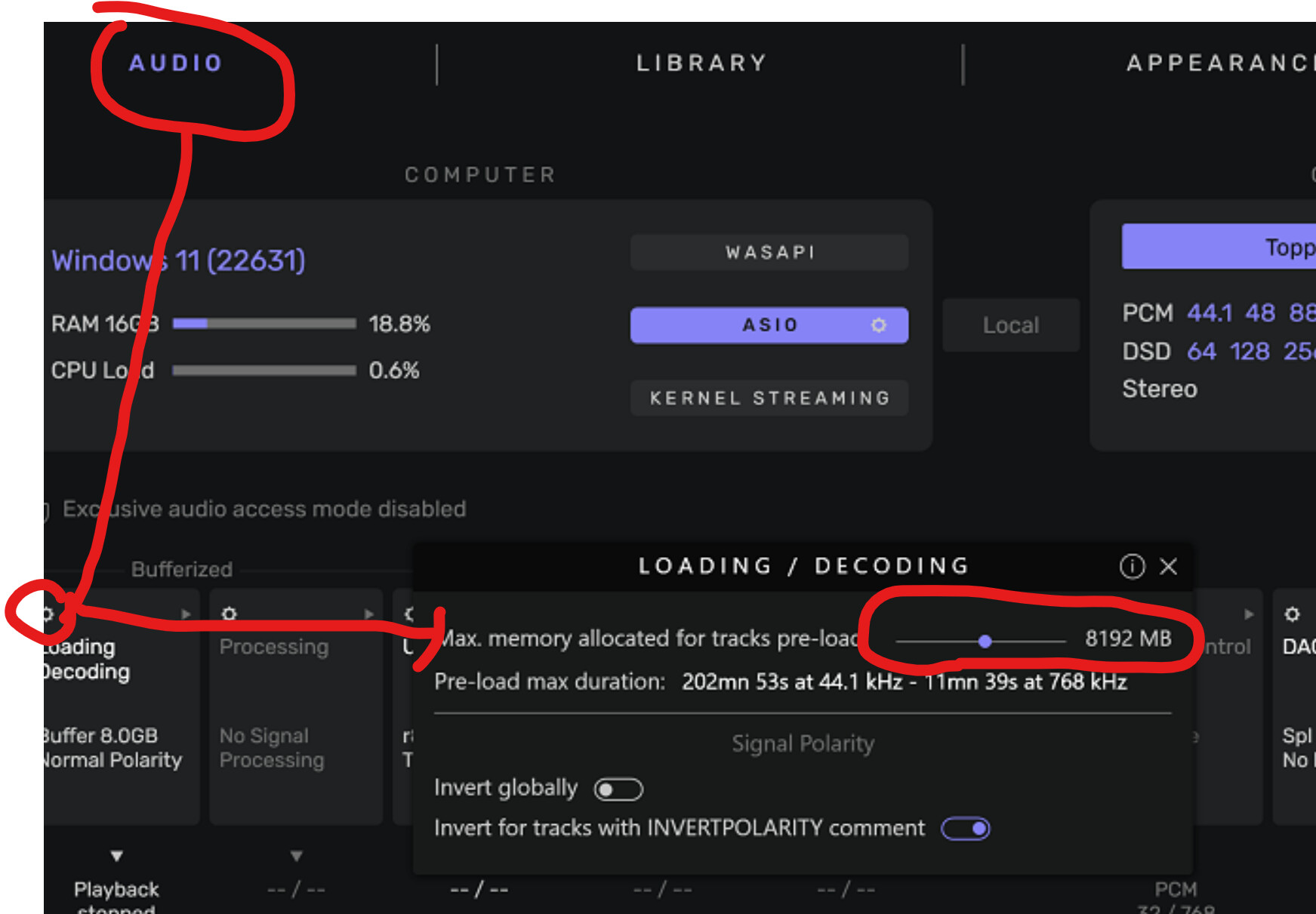
The RAM requirements on a Windows machine are about the same as on a Mac.
@Djm1960
I use a Mac mini M2 with 16Gb of RAM.
I leave 6Gb for the Audirvana because I’m upsampling from PCM to DSD256.
I’m on mcOS Sonoma.
This Mac mini is exclusively for audio, I only have Audirvana Studio installed.
For me it works without any problems.
Yes, I would expect it to! Good spec for your use case.
However, you see the benefits of M2 memory throughput in concert with CPU processing power and an abundance of memory… These things are symbiotic to the final output signal being reproduced by the DAC… The issue is all about intrinsic noise (jitter) induced by the platform operations, memory requests, bus management, packetizing, etc,
The idea of high-end audio playback does not contain superfluous simultaneous user tasks… If folks want to distribute audio all over the house, then this poses a compromise to sound-quality and the audition of music at the highest-quality of playback.
The simple local connection is the focus and should always be the focus for a high-end system configuration.
The $30,000 USD Taiko Audio Extreme Server is the benchmark for superior playback sound-quality and this vertically integrated system is best served by a short signal path… My feeling is that a well configured system with a M2 or M2 Ultra MacStudio running Audirvana can produce a competitive quality of sound in comparison and provide for the general home computing environment.
So you see the use cases are primarily centered around ultimate performance… not convenience of ubiquity… iTunes and AirPlay can provide the ubiquity of distributed audio in the home.
The reason folks like me have migrated to Audirvana is because of sound-quality and high-end audio-centricity within a streamlined application running on a host platform. My intention here in the Community is to support aiming high, not low, in regard to optimum playback performance. This does not mean that a $30,000 USD spend on a component or otherwise is needed to hit the mark…
Good information.
The M3 being so powerful & recent fast data flow architecture over the whole mother board is probably not a good example of how much ram you need.
Just FYI the Taiko Extreme is now being replaced by the successor Taiko Olympus which is much better but also much more expensive:
https://www.whatsbestforum.com/threads/introducing-olympus-olympus-i-o-a-new-perspective-on-modern-music-playback.37939/
There you go…not even on the Taiko Audio website This arena is always changing and the references keep evolving or give-way to a new generation reference… New materials like room-temperature super-conducting metals are going to continue to reshape the audiophile perspective… Do we need these reference? Most certainly… It gives us something to aim for in our system configurations in concert with Audirvana… as humble they may be… 

I certainly hope the number of atoms in my left- and right speaker cables is the same and that they are distributed equally. I cannot live with the idea that this could be the reason for a sonic inbalance.
Can somebody point me to a reasonably priced refurbished high-end audiophile atom distribution counter? Just to make sure?
Heheh…